
R211x-HP Flexfabric 11900 MPLS Configuration Guide


51
Configuring tunnel setup retry
If the ingress node fails to establish an MPLS TE tunnel, it waits for the retry interval, and then tries to set
up the tunnel again. It repeats this process until the tunnel is established or until the number of attempts
reaches the maximum. If the tunnel cannot be established when the number of attempts reaches the
maximum, the ingress waits for a longer period and then repeats the previous process.
To configure tunnel setup retry:
Ste
p
Command
Remarks
1. Enter system view.
system-view N/A
2. Enter MPLS TE tunnel interface
view.
interface tunnel tunnel-number
[ mode mpls-te ]
N/A
3. Configure maximum number
of tunnel setup attempts.
mpls te retry times
By default, the maximum number of
attempts is 3.
4. Configure the retry interval.
mpls te timer retry seconds
By default, the retry interval is 2
seconds.
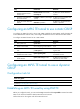
Configuring RSVP resource reservation style
Ste
p
Command
Remarks
1. Enter system view.
system-view N/A
2. Enter MPLS TE tunnel
interface view.
interface tunnel tunnel-number
[ mode mpls-te ]
N/A
3. Configure the resources
reservation style for the
tunnel.
mpls te resv-style { ff | se }
By default, the resource reservation
style is SE.
In current MPLS TE applications,
tunnels are established by using the
make-before-break mechanism.
Therefore, HP recommends that you
use the SE style.
Configuring static routing to direct traffic to an
MPLS TE tunnel
Perform the task on the ingress node of the MPLS TE tunnel.
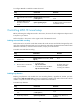
To configure static routing to direct traffic to an MPLS TE tunnel:
Ste
p
Command
Remarks
1. Enter system view.
system-view N/A
2. Configure a static route to
direct traffic to an MPLS TE
tunnel.
For information about static routing
commands, see Layer 3—IP
Routing Command Reference.
By default, no static route exists on
the device.
The interface specified in this
command must be an MPLS TE
tunnel interface.