
R211x-HP Flexfabric 11900 MPLS Configuration Guide

58
Establishing an MPLS TE tunnel with RSVP-TE
Network requirements
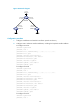
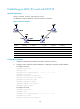
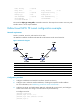
Switch A, Switch B, Switch C, and Switch D run IS-IS.
Use RSVP-TE to create an MPLS TE tunnel from Switch A to Switch D.
Figure 21 Network diagram
Device
Interface IP address Device Interface IP address
Switch A Loop0 1.1.1.9/32 Switch D Loop0 4.4.4.9/32
Vlan-int1 10.1.1.1/24
Vlan-int3
30.1.1.2/24
Switch B Loop0 2.2.2.9/32
Switch C
Loop0
3.3.3.9/32
Vlan-int1 10.1.1.2/24 Vlan-int3 30.1.1.1/24
Vlan-int2 20.1.1.1/24
Vlan-int2
20.1.1.2/24
Configuration procedure
1. Configure IP addresses and masks for interfaces. (Details not shown.)
2. Configure IS-IS to advertise interface addresses, including the loopback interface address:
# Configure Switch A.
<SwitchA> system-view
[SwitchA] isis 1
[SwitchA-isis-1] network-entity 00.0005.0000.0000.0001.00
[SwitchA-isis-1] quit
[SwitchA] interface vlan-interface 1
[SwitchA-Vlan-interface1] isis enable 1
[SwitchA-Vlan-interface1] quit
[SwitchA] interface loopback 0
[SwitchA-LoopBack0] isis enable 1
[SwitchA-LoopBack0] quit
# Configure Switch B.
<SwitchB> system-view
[SwitchB] isis 1
[SwitchB-isis-1] network-entity 00.0005.0000.0000.0002.00
[SwitchB-isis-1] quit
[SwitchB] interface vlan-interface 1