
R211x-HP Flexfabric 11900 MPLS Configuration Guide

84
If the device receives a hello request from the neighbor, the device replies with a hello ACK message. If
the device receives no hello request from the neighbor within the interval specified by the hello interval
command, the device sends hello requests to the neighbor.
When the number of consecutive lost hellos or erroneous hellos from the neighbor reaches the maximum
(specified by the hello lost command), the device determines the neighbor is in fault. If GR is configured,
the device serves as a GR helper to help the neighbor to restart.
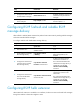
To configure RSVP hello extension:
Ste
p
Command
Remarks
1. Enter system view.
system-view N/A
2. Enter RSVP view.
rsvp N/A
3. Configure the maximum
number of consecutive lost or
erroneous hellos.
hello lost times
By default, the maximum number is
4.
4. Configure the interval for
sending hello requests.
hello interval interval
By default, hello requests are sent
every 5 seconds.
5. Return to system view.
quit N/A
6. Enter interface view.
interface interface-type
interface-number
N/A
7. Enable RSVP hello extension.
rsvp hello enable
By default, RSVP hello extension is
disabled.
Configuring RSVP authentication
RSVP adopts hop-by-hop authentication to prevent fake resource reservation requests from occupying
network resources. The interfaces at the two ends of a link must use the same authentication key.
RSVP authentication can be configured in the following views:
• RSVP view—Configuration in this view applies to all RSVP security associations.
• RSVP neighbor view—Configuration in this view applies only to RSVP security associations with the
specified RSVP neighbor.
• Interface view—Configuration in this view applies only to RSVP security associations established on
the current interface.
Configurations in RSVP neighbor view, interface view, and RSVP view are in descending order of priority.
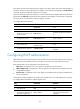
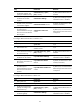
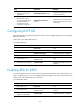
To configure RSVP authentication in RSVP neighbor view:
Ste
p
Command
Remarks
1. Enter system view.
system-view N/A
2. Enter RSVP view.
rsvp
N/A
3. Create an RSVP
authentication neighbor and
enter RSVP neighbor view.
peer ip-address
By default, the device does not
have any RSVP authentication
neighbors.