
R211x-HP Flexfabric 11900 Network Management and Monitoring Command Reference

105
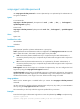
Field Descri
p
tion
Storage-type
Storage type:
• volatile.
• nonvolatile.
• permanent.
• readOnly.
• other.
For more information about these storage types, see Table 20.
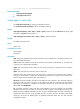
UserStatus
SNMP user status:
• active—The SNMP user is effective.
• notInService—The SNMP user is correctly configured but not activated.
• notReady—The SNMP user configuration is incomplete.
• other—Any other status.
SNMP users are active upon their creation at the CLI. To temporarily disable an
SNMP user without deleting it, you can perform an SNMP set operation to change
its status.
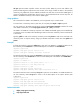
ACL
Number of the ACL that controls the access of the SNMP user (the NMS) to the
device.
To access the device, the IP address of the NMS must be permitted in the ACL.
This field appears only when an SNMP user is associated with an ACL rule.
Related commands
snmp-agent usm-user v3
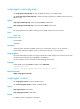
enable snmp trap updown
Use enable snmp trap updown to enable link state notifications on an interface.
Use undo enable snmp trap updown to disable link state notifications on an interface.
Syntax
enable snmp trap updown
undo enable snmp trap updown
Default
Link state notifications are enabled.
Views
Interface view
Predefined user roles
network-admin
network-operator
mdc-admin
mdc-operator