
R211x-HP Flexfabric 11900 Network Management and Monitoring Command Reference


127
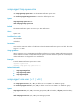
snmp-agent trap queue-size
Use snmp-agent trap queue-size to set the SNMP notification queue size.
Use undo snmp-agent trap queue-size to restore the default queue size.
Syntax
snmp-agent trap queue-size size
undo snmp-agent trap queue-size
Default
The SNMP notification queue can store up to 100 notifications.
Views
System view
Predefined user roles
network-admin
mdc-admin
Parameters
size: Sets the maximum number of notifications that the SNMP notification queue can hold. The value
range is 1 to 1000.
Usage guidelines
When congestion occurs, the SNMP agent buffers notifications in a queue. SNMP notification queue size
sets the maximum number of notifications that this queue can hold. When the queue size is reached, the
oldest notifications are dropped for new notifications.
Examples
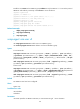
# Set the SNMP notification queue size to 200.
<Sysname> system-view
[Sysname] snmp-agent trap queue-size 200
Related commands
• snmp-agent target-host
• snmp-agent trap enable
• snmp-agent trap life
snmp-agent usm-user { v1 | v2c }
Use snmp-agent usm-user { v1 | v2c } to add a user to an SNMPv1 or SNMPv2c group.
Use undo snmp-agent usm-user { v1 | v2c } to delete a user from an SNMPv1 or SNMPv2c group.
Syntax
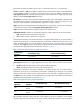
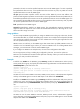
snmp-agent usm-user { v1 | v2c } user-name group-name [ acl acl-number | acl ipv6 ipv6-acl-number ]
*
undo snmp-agent usm-user { v1 | v2c } user-name group-name