
R211x-HP Flexfabric 11900 Network Management and Monitoring Command Reference

143
display rmon statistics
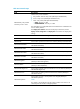
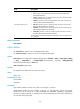
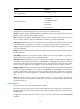
Use display rmon statistics to display RMON statistics.
Syntax
display rmon statistics [ interface-type interface-number ]
Views
Any view
Predefined user roles
network-admin
network-operator
mdc-admin
mdc-operator
Parameters
interface-type interface-number: Specifies an interface by its type and number. If no interface is specified,
the command displays RMON statistics for all interfaces.
Usage guidelines
This command displays the cumulative interface statistics for the period from the time the statistics entry
was created to the time the command was executed. The statistics are cleared when the device reboots.
Examples
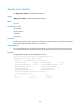
# Display RMON statistics for Ten-GigabitEthernet 1/0/1.
<Sysname> display rmon statistics ten-gigabitethernet 1/0/1
EtherStatsEntry 1 owned by user1 is VALID.
Interface : Ten-GigabitEthernet1/0/1<ifIndex.3>
etherStatsOctets : 43393306 , etherStatsPkts : 619825
etherStatsBroadcastPkts : 503581 , etherStatsMulticastPkts : 44013
etherStatsUndersizePkts : 0 , etherStatsOversizePkts : 0
etherStatsFragments : 0 , etherStatsJabbers : 0
etherStatsCRCAlignErrors : 0 , etherStatsCollisions : 0
etherStatsDropEvents (insufficient resources): 0
Incoming packets by size:
64 : 0 , 65-127 : 0 , 128-255 : 0
256-511: 0 , 512-1023: 0 , 1024-1518: 0