
R211x-HP Flexfabric 11900 Network Management and Monitoring Command Reference


169
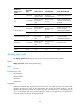
Field Descri
p
tion
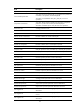
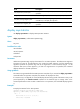
Sum/Square-Sum positive jitter
Sum/square sum of the positive jitter, available only in the path jitter
operation.
Negative jitter number Number of negative jitter, available only in the path jitter operation.
Min/Max/Average negative jitter
Minimum/maximum/average negative jitter in milliseconds,
available only in the path jitter operation.
Sum/Square-Sum negative jitter
Sum/square sum of the negative jitter, available only in the path jitter
operation.
display nqa statistics
Use display nqa statistics to display NQA operation statistics.
Syntax
display nqa statistics [ admin-name operation-tag ]
Views
Any view
Predefined user roles
network-admin
network-operator
mdc-admin
mdc-operator
Parameters
admin-name operation-tag: Displays the statistics for an NQA operation. The admin-name argument
represents the name of the administrator who creates the NQA operation, and the operation-tag
argument represents the operation tag. Each of the arguments is a case-insensitive string of 1 to 32
characters that cannot contain hyphens (-). If these two arguments are not specified, the command
displays statistics for all NQA operations.
Usage guidelines
The statistics are generated after the NQA operation completes. If you execute the display nqa statistics
command before the operation completes, the statistics are displayed as all 0s.
If a reaction entry is configured, the command displays the monitoring results of the reaction entry in the
period specified by the statistics internal command. If the threshold type is average value or the
monitored performance metric is ICPIF or MOS for the voice operation, the result fields display hyphens
(-).
Examples
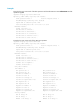
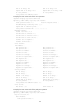
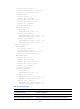
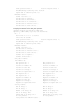
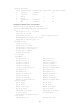
# Display the statistics for the TCP operation.
<Sysname> display nqa statistics admin test
NQA entry (admin admin, tag test) test statistics:
NO. : 1
Start time: 2007-01-01 09:30:20.0
Life time: 2 seconds