
R211x-HP Flexfabric 11900 Network Management and Monitoring Command Reference
207
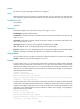
Usage guidelines
The reaction trap test-complete command is supported only for the UDP jitter and voice operations.
Examples
# Configure the system to send a trap if the number of consecutive probe failures in an ICMP echo
operation is greater than or equal to 5.
<Sysname> system-view
[Sysname] nqa entry admin test
[Sysname-nqa-admin-test] type icmp-echo
[Sysname-nqa-admin-test-icmp-echo] reaction trap probe-failure 5
reaction trigger probe-fail
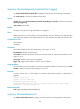
Use reaction trigger probe-fail to configure the number of consecutive probe failures that lead to an
operation failure.
Use undo reaction trigger probe-fail to restore the default.
Syntax
reaction trigger probe-fail count
undo reaction trigger probe-fail
Default
When the number of consecutive probe failures reaches 3, the operation fails.
Views
Any NQA template view
Predefined user roles
network-admin
mdc-admin
Parameters
count: Specifies the number of consecutive probe failures, in the range of 1 to 15.
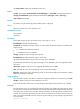
Usage guidelines
If the number of consecutive probe failures for an NQA operation is reached, the NQA client notifies the
feature that uses the NQA template of the probe failure.
Examples
# In HTTP template view, if the number of consecutive probe failures reaches 5, the operation fails.
<Sysname> system-view
[Sysname] nqa template http httptplt
[Sysname-nqatplt-http-httptplt] reaction trigger probe-fail 5
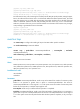
reaction trigger probe-pass
Use reaction trigger probe-pass to configure the number of consecutive successful probes that lead to a
successful operation.
Use undo reaction trigger probe-fail to restore the default.