
R211x-HP Flexfabric 11900 Network Management and Monitoring Command Reference
208
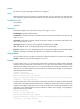
Syntax
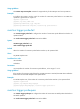
reaction trigger probe-pass count
undo reaction trigger probe-pass
Default
When the number of consecutive successful probes reaches 3, the operation succeeds.
Views
Any NQA template view
Predefined user roles
network-admin
mdc-admin
Parameters
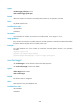
count: Specifies the number of consecutive successful probes, in the range of 1 to 15.
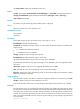
Usage guidelines
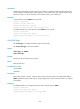
If the number of consecutive successful probes for an NQA operation is reached, the NQA client notifies
the feature that the template of the successful probe event.
Examples
# In HTTP template view, if the number of consecutive successful probes reaches 5, the operation
succeeds.
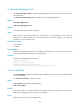
<Sysname> system-view
[Sysname] nqa template http httptplt
[Sysname-nqatplt-http-httptplt] reaction trigger probe-pass 5
resolve-target
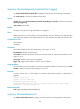
Use resolve-target to set the domain name for the DNS operation.
Use undo resolve-target to restore the default.
Syntax
resolve-target domain-name
undo resolve-target
Default
No domain name is configured.
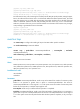
Views
DNS operation view, DNS template view
Predefined user roles
network-admin
mdc-admin