
R211x-HP Flexfabric 11900 Network Management and Monitoring Command Reference
30
Examples
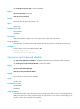
# Enable the NTP service.
<Sysname> system-view
[Sysname] ntp-service enable
ntp-service inbound disable
Use ntp-service inbound disable to disable an interface from processing NTP messages.
Use undo ntp-service inbound disable to restore the default.
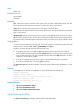
Syntax
ntp-service inbound disable
undo ntp-service inbound disable
Default
An interface processes NTP messages.
Views
Interface view
Predefined user roles
network-admin
mdc-admin
Usage guidelines
To disable an interface on the device from synchronizing the peer device in the corresponding subnet or
disable the device from being synchronized by the peer device in the subnet corresponding to an
interface, execute the command on the interface.
Examples
# Disable VLAN-interface 1 from processing NTP messages.
<Sysname> system-view
[Sysname] interface vlan-interface 1
[Sysname-Vlan-interface1] ntp-service inbound disable
ntp-service ipv6 acl
Use ntp-service ipv6 acl to configure the access-control right for the peer devices to access the IPv6 NTP
services of the local device.
Use undo ntp-service ipv6 acl to remove the configured NTP service access-control right.
Syntax
ntp-service ipv6 { peer | query | server | synchronization } acl acl-number
undo ntp-service ipv6 { peer | query | server | synchronization } acl acl-number
Default
The access-control right for the peer devices to access the IPv6 NTP services of the local device is peer.