
R211x-HP Flexfabric 11900 Network Management and Monitoring Command Reference




57
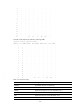
Max buffer size 1024, current buffer size 512,
Current messages 0, dropped messages 0, overwritten messages 0
Log file: Enabled
Security log file: Enabled
Information timestamp format:
Loghost: Date
Other output destination: Date
display logbuffer
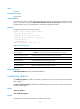
Use display logbuffer to display the state of the log buffer and the log information in the log buffer.
Syntax
In standalone mode:
display logbuffer [ reverse ] [ level severity | size buffersize | slot slot-number ] *
In IRF mode:
display logbuffer [ reverse ] [ level severity | size buffersize | chassis chassis-number slot slot-number ]
*
Views
Any view
Predefined user roles
network-admin
network-operator
mdc-admin
mdc-operator
Parameters
reverse: Displays log entries chronologically, with the most recent entry at the top. Without this keyword,
the command displays log entries chronologically, with the oldest entry at the top.
level severity: Specifies a severity level in the range of 0 to 7. Without this keyword, the command
displays log information for all levels.
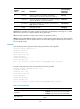
Table 14 Log levels
Severity
value
Level Description
Corresponding
keyword in
commands
0 Emergency
The system is unusable. For example, the system
authorization has expired.
emergency
1 Alert
Action must be taken immediately. For example, traffic on
an interface exceeds the upper limit.
alert
2 Critical
Critical condition. For example, the device temperature
exceeds the upper limit, the power module fails, or the fan
tray fails.
critical
3 Error Error condition. For example, the link state changes. error