
R211x-HP Flexfabric 11900 Network Management and Monitoring Command Reference




59
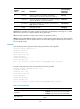
Field Descri
p
tion
Actual buffer size
Actual number of logs that can be stored in the log
buffer. (This value is specified with the info-center
logbuffer size command.)
Dropped messages Number of dropped messages.
Overwritten messages Number of overwritten messages.
Current messages Number of current messages.
Related commands
• info-center logbuffer
• reset logbuffer
display logbuffer summary
Use display logbuffer summary to display the summary of the log buffer.
Syntax
In standalone mode:
display logbuffer summary [ level severity | slot slot-number ] *
In IRF mode:
display logbuffer summary [ level severity | chassis chassis-number slot slot-number ] *
Views
Any view
Predefined user roles
network-admin
network-operator
mdc-admin
mdc-operator
Parameters
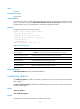
level severity: Specifies a severity level in the range of 0 to 7. Without this keyword, the command
displays log information of all levels in the log buffer. For more information about log levels, see 0.
slot slo
t-number: Specifies a card by its slot number. (In standalone mode.)
chassis chassis-number slot slot-number: Specifies a card on an IRF member device. The chassis-number
argument specifies the ID of the member device. The slot-number argument specifies the slot number of
the card. (In IRF mode.)
Examples
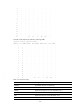
# (In standalone mode.) Display the summary of the log buffer.
<Sysname> display logbuffer summary
SLOT EMERG ALERT CRIT ERROR WARN NOTIF INFO DEBUG
0 0 0 0 0 0 0 0 0
1 0 0 0 0 0 0 0 0