
R211x-HP Flexfabric 11900 Network Management and Monitoring Command Reference




62
Views
Any view
Predefined user roles
security-audit
Usage guidelines
A local user can use this command only after being authorized as the security log administrator by the
system administrator through the authorization-attribute user-role security-audit command. For more
information about security log administrator, see Security Configuration Guide.
Examples
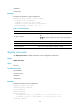
# Display the summary of the security log file.
<Sysname> display security-logfile summary
Security log file: Enabled
Security log file size quota: 10 MB
Security log file directory: flash:/seclog
Alarm threshold: 80%
Current usage: 30%
Writing frequency: 1 hour 0 min 0 sec
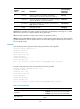
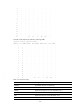
Table 18 Command output
Field Descri
p
tion
Security log file
• Enabled—Security logs can be output to the security log file.
• Disabled—Security logs cannot be output to the security log file.
Security log file size quota Maximum storage space reserved for the security log file.
Security log file directory Security log file directory.
Alarm-threshold Alarm threshold of the security log file usage.
Current usage Current usage of the security log file.
Writing frequency Interval at which the security log file is saved.
Related commands
authorization-attribute (Security Command Reference)
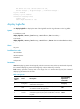
enable log updown
Use enable log updown to enable an interface to generate link up or link down logs when the interface
state changes.
Use undo enable log updown to disable an interface from generating link up or link down logs when the
interface state changes.
Syntax
enable log updown
undo enable log updown
Default
All interfaces are allowed to generate link up and link down logs.