
R211x-HP Flexfabric 11900 Network Management and Monitoring Command Reference

76
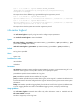
Usage guidelines
This feature enables the system to output security logs into the security log file buffer, and saves the logs
from the buffer to the security log file at a specific interval.
Examples
# Enable saving security logs into the security log file.
<Sysname> system-view
[Sysname] info-center security-logfile enable
info-center security-logfile frequency
Use info-center security-logfile frequency to configure the interval for saving security logs to the security
log file.
Use undo info-center security-logfile frequency to restore the default saving interval.
Syntax
info-center security-logfile frequency freq-sec
undo info-center security-logfile frequency
Default
The saving interval is 86400 seconds.
Views
System view
Predefined user roles
network-admin
mdc-admin
Parameters
freq-sec: Specifies a saving interval in the range of 10 to 86400 seconds.
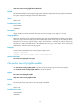
Usage guidelines
The system first outputs the security logs to the security log file buffer, and then saves the logs in the buffer
into the security log file at the specified interval.
Examples
# Save security logs to the security log file every 600 seconds.
<Sysname> system-view
[Sysname] info-center security-logfile frequency 600
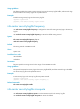
Related commands
info-center security-logfile enable
info-center security-logfile size-quota
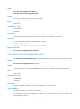
Use info-center security-logfile size-quota to set the maximum size for the security log file.
Use undo info-center security-logfile size-quota to restore the default.