
R211x-HP Flexfabric 11900 Network Management and Monitoring Command Reference

88
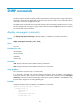
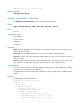
Community name: bb
Group name: bb
Storage-type: nonVolatile
Community name: userv1
Group name: testv1
Storage-type: nonVolatile
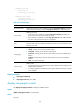
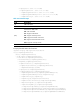
Table 20 Command output
Field Descri
p
tion
Community name
Displays the community name created by using the snmp-agent community command
or the username created by using the snmp-agent usm-user { v1 | v2c } command.
Group name
SNMP group name.
• If the community is created by using the snmp-agent community command, the
group name is the same as the community name.
• If the community is created by using the snmp-agent usm-user { v1 | v2c } command,
the name of the group that has the user is displayed.
ACL
Number of the ACL that controls the access of the NMSs in the community to the device.
Only the NMSs with the IP addresses permitted in the ACL can access the device with
the community name.
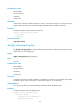
Storage-type
Storage type:
• volatile—Settings are lost when the system reboots.
• nonVolatile—Settings remain after the system reboots.
• permanent—Settings remain after the system reboots and can be modified but not
deleted.
• readOnly—Settings remain after the system reboots and cannot be modified or
deleted.
• other—Any other storage type.
Context name
SNMP context:
• If a mapping between an SNMP community and an SNMP context is configured, the
SNMP context is displayed.
• If no mapping between an SNMP community and an SNMP context exists, this field
is not displayed.
Related commands
• snmp-agent community
• snmp-agent usm-user { v1 | v2c }
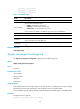
display snmp-agent context
Use display snmp-agent context to display an SNMP context.
Syntax
display snmp-agent context [ context-name ]
Views
Any view