
R211x-HP Flexfabric 11900 Network Management and Monitoring Configuration Guide

102
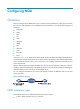
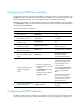
The NQA client simulates the DHCP relay agent to forward DHCP requests for IP address acquisition
from the DHCP server. The interface that performs the DHCP operation does not change its IP address.
When the DHCP operation completes, the NQA client sends a packet to release the obtained IP address.
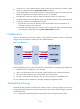
To configure the DHCP operation:
Ste
p
Command
Remarks
1. Enter system view.
system-view N/A
2. Create an NQA operation
and enter NQA operation
view.
nqa entry admin-name
operation-tag
By default, no NQA operation is
created.
3. Specify the DHCP type and
enter its view.
type dhcp N/A
4. Specify the IP address of the
DHCP server as the
destination address of DHCP
packets.
destination ip ip-address
By default, no destination IP
address is specified.
5. (Optional.) Specify the IP
address in the giaddr field as
the source IP address of DHCP
request packets.
source ip ip-address
By default, no source IP address is
specified, and the NQA client
adds the IP address of the interface
that sends a DHCP request to the
giaddr field.
For more information about the
giaddr field, see Layer 3—IP
Services Configuration Guide.
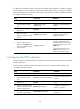
Configuring the DNS operation
The DNS operation measures the time for the NQA client to translate a domain name into an IP address
through a DNS server.
A DNS operation simulates domain name resolution and does not save the obtained DNS entry.
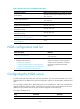
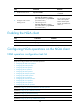
To configure the DNS operation:
Ste
p
Command
Remarks
1. Enter system view.
system-view N/A
2. Create an NQA operation
and enter NQA operation
view.
nqa entry admin-name operation-tag
By default, no NQA operation is
created.
3. Specify the DNS type and
enter its view.
type dns N/A
4. Specify the IP address of the
DNS server as the destination
address of DNS packets.
destination ip ip-address
By default, no destination IP
address is specified.
5. Specify the domain name
that needs to be translated.
resolve-target domain-name
By default, no domain name is
specified.