
R211x-HP Flexfabric 11900 Network Management and Monitoring Configuration Guide


104
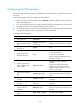
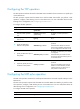
Configuring the HTTP operation
An HTTP operation measures the time for the NQA client to obtain data from an HTTP server.
To configure an HTTP operation:
Ste
p
Command
Remarks
1. Enter system view.
system-view N/A
2. Create an NQA operation
and enter NQA operation
view.
nqa entry admin-name
operation-tag
By default, no NQA operation is created.
3. Specify the HTTP type and
enter its view.
type http N/A
4. Specify the URL of the
destination HTTP server.
url url
Enter the URL in the format of
http://host/resource or
http://host:port/resource, where the host
argument represents the IP address or host
name of the remote device, the port
argument represents the port of the remote
device, and the resource argument
represents the resource on the remote
device.
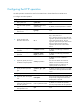
5. Specify an HTTP login
username.
username username
By default, no HTTP login username is
specified.
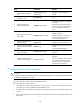
6. Specify an HTTP login
password.
password { cipher |
simple } password
By default, no HTTP login password is
specified.
7. (Optional.) Specify the source
IP address of request packets.
source ip ip-address
By default, no source IP address is
specified.
The source IP address must be the IP
address of a local interface, and the
interface must be up. Otherwise, no
request packets can be sent out.
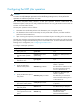
8. Specify the HTTP operation
type.
operation { get | post |
raw }
By default, the HTTP operation type is get,
which means obtaining data from the HTTP
server.
9. Specify the HTTP version.
version { v1.0 | v1.1 } By default, HTTP 1.0 is used.
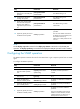
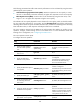
10. (Optional.) Enter raw request
view.
raw-request
Every time you enter the raw request view,
the previously configured content of the
HTTP request is removed.
11. (Optional.) Specify the
content of a GET request for
the HTTP operation.
Enter or paste the content.
By default, no contents are specified.
This step is required for the raw operation.
12. Save the input and exit to
HTTP operation view.
quit N/A