
R211x-HP Flexfabric 11900 Network Management and Monitoring Configuration Guide


108
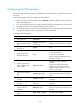
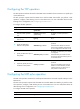
Ste
p
Command
Remarks
2. Create an NQA operation
and enter NQA operation
view.
nqa entry admin-name
operation-tag
By default, no NQA operation is
created.
3. Specify the UDP echo type
and enter its view.
type udp-echo N/A
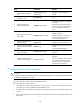
4. Specify the destination
address of UDP packets.
destination ip ip-address
By default, no destination IP address
is specified.
The destination address must be the
same as the IP address of the listening
service configured on the NQA
server.
5. Specify the destination port of
UDP packets.
destination port port-number
By default, no destination port
number is specified.
The destination port number must be
the same as that of the listening
service on the NQA server.
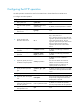
6. Specify the payload size in
each UDP packet.
data-size size The default setting is 100 bytes.
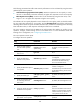
7. Specify the string to be filled
in the payload of each UDP
packet.
data-fill string
The default setting is the hexadecimal
number
00010203040506070809.
8. (Optional.) Specify the source
port of UDP packets.
source port port-number
By default, no source port number is
specified.
9. (Optional.) Specify the source
IP address of UDP packets.
source ip ip-address
By default, no source IP address is
specified.
The source IP address must be that of
an interface on the device and the
interface must be up. Otherwise, no
UDP packets can be sent out.
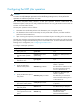
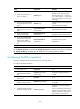
Configuring the voice operation
CAUTION:
To ensure successful voice operations and avoid affecting existing services, do not perform the operations
on well-known ports from 1 to 1023.
The voice operation measures VoIP network performance.
The voice operation works as follows:
1. The NQA client sends voice packets of G.711 A-law, G.711 μ-law or G.729 A-law codec type at
a specific interval to the destination device (NQA server).
2. The destination device takes a time stamp to each voice packet it receives and sends it back to the
source.
3. Upon receiving the packet, the source device calculates the jitter and one-way delay based on the
time stamp.