
R211x-HP Flexfabric 11900 Network Management and Monitoring Configuration Guide

118
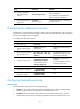
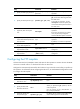
Configuring the ICMP template
A feature that uses the ICMP template creates and starts the ICMP operation to measure the reachability
of a destination device. The ICMP template is supported in both IPv4 and IPv6 networks.
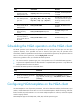
To configure the ICMP template:
Ste
p
Command
Remarks
1. Enter system view.
system-view N/A
2. Create an ICMP template and
enter its view.
nqa template icmp name N/A
3. (Optional.) Specify the
destination IPv4 or IPv6
address of the operation.
• IPv4 address:
destination ip ip-address
• IPv6 address:
destination ipv6
ipv6-address
By default, no destination IP address
is configured.
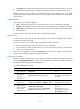
4. Specify the payload size in
each ICMP request.
data-size size The default setting is 100 bytes.
5. Specify the string to be filled in
the payload of each request.
data-fill string
The default setting is the
hexadecimal number
00010203040506070809.
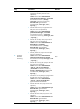
6. (Optional.) Specify the IP
address of the specified
interface as the source IP
address of ICMP echo
requests.
source interface interface-type
interface-number
By default, no source IP address is
specified. The requests use the
primary IP address of the outgoing
interface as their source IP address.
If you configure both source ip and
source interface, the most recent
configuration takes effect.
The specified source interface must
be up. The source IP address must be
the IP address of a local interface
and the interface must be up.
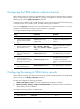
Configuring the DNS template
A feature that uses the DNS template creates and starts the DNS operation to determine the status of the
server. It is supported in both IPv4 and IPv6 networks.
In DNS template view, you can specify the address expected to be returned. If the returned IP addresses
include the expected address, the DNS server is valid and the operation succeeds. Otherwise, the
operation fails.
Create a mapping between the domain name and an address before you perform the DNS operation.
For information about configuring the DNS server, see Layer 3—IP Services Configuration Guide.
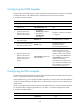
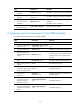
To configure the DNS template:
Ste
p
Command
Remarks
1. Enter system view.
system-view N/A