
R211x-HP Flexfabric 11900 Network Management and Monitoring Configuration Guide

120
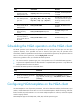
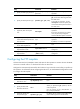
Ste
p
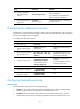
Command
Remarks
4. (Optional.) Configure the
destination port number for the
operation.
destination port port-number
By default, no destination port
number is configured.
The destination port number must
be the same as the port number
of the listening service on the
NQA server.
5. Specify the string to be filled in
the payload of each request.
data-fill string
The default setting is the
hexadecimal number
00010203040506070809.
6. (Optional.) Configure the
expected data.
expect data expression [ offset
number ]
By default, no expected data is
configured.
This command takes effect only
when you configure the data-fill
command.
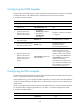
Configuring the HTTP template
A feature that uses the HTTP template creates and starts the HTTP operation to measure the amount of
time it takes for the NQA client to obtain data from an HTTP server.
The expected data is checked only when the expected data is configured and the HTTP response
contains the Content-Length field in the HTTP header. The Content-Length field indicates the packet body
length, and it does not include the header length. An HTTP packet with this field indicates that the packet
data does not include the multipart type and the packet body is a data type.
The status code of the HTTP packet is a three-digit field in decimal notation, and it includes the status
information for the HTTP server. The first digit defines the class of response, and the last two digits do not
have any categorization role.
Configure the HTTP server before you perform the HTTP operation.
To configure the HTTP template:
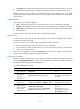
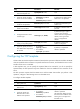
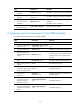
Ste
p
Command
Remarks
1. Enter system view.
system-view N/A
2. Create an HTTP template and
enter its view.
nqa template http name N/A
3. Specify the URL of the
destination HTTP server.
url url
Enter the URL in the format of
http://host/resource or
http://host:port/resource, where the
host argument refers to the IP address
or host name of the remote host, the
port argument represents the port of
the remote device, and the resource
argument refers to the resource on the
HTTP server.
4. Specify an HTTP login username.
username username
By default, no HTTP login username is
specified.