
R211x-HP Flexfabric 11900 Network Management and Monitoring Configuration Guide

122
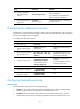
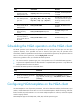
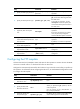
Ste
p
Command
Remarks
5. Specify an FTP login
username.
username username By default, no FTP login username is specified.
6. Specify an FTP login
password.
password { cipher | simple }
password
By default, no FTP login password is specified.
7. (Optional.) Specify the
name of a file to be
transferred.
filename filename
This step is required if you perform the put
operation.
By default, no file is specified.
8. Set the data
transmission mode.
mode { active | passive } The default mode is active.
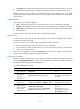
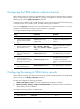
Configuring optional parameters for the NQA template
To configure optional parameters for an NQA template:
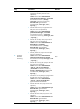
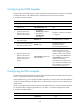
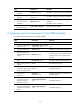
Ste
p
Command
Remarks
1. Enter system view.
system-view N/A
2. Create an NQA template
and enter its view.
nqa template { dns | ftp | http
| icmp | tcp } name
N/A
3. Configure a description.
description text By default, no description is configured.
4. Specify the interval at
which the NQA operation
repeats.
frequency interval
The default setting is 5000 milliseconds.
If the operation is not completed when the
interval expires, the next operation does
not start.
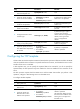
5. Specify the probe timeout
time.
probe timeout timeout The default setting is 3000 milliseconds.
6. Specify the TTL for probe
packets.
ttl value The default setting is 20.
7. (Optional.) Specify the
ToS value in the IP packet
header of probe packets.
tos value The default setting is 0.
8. Specify the VPN where
the operation is
performed.
vpn-instance
vpn-instance-name
By default, the operation is performed on
the public network.
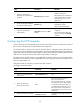
9. Configure the number of
consecutive successful
probes that lead to a
successful operation.
reaction trigger probe-pass
count
The default setting is 3.
10. Configure the number of
consecutive probe failures
that lead to an operation
failure.
reaction trigger probe-fail
count
The default setting is 3.