
R211x-HP Flexfabric 11900 Network Management and Monitoring Configuration Guide

153
Configuring source ports for the local mirroring group
You can configure a list of source ports for a mirroring group in system view, or assign a port to it as a
source port in interface view. To assign multiple ports to the mirroring group as source ports in interface
view, repeat the operation.
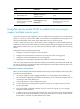
Configuration restrictions and guidelines
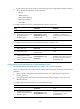
When you configure source ports for a local mirroring group, follow these restrictions and guidelines:
• A mirroring group can contain multiple source ports.
• A port can serve as a source port for multiple mirroring groups, but cannot be a reflector port,
egress port, or monitor port at the same time.
Configuration procedure
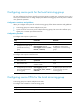
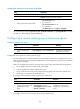
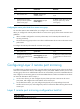
To configure source ports in system view:
Ste
p
Command
Remarks
1. Enter system view.
system-view N/A
2. Configure source ports for the
specified local mirroring
group.
mirroring-group group-id
mirroring-port interface-list { both |
inbound | outbound }
By default, no source port is
configured for a local mirroring
group.
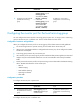
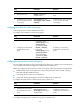
To configure source ports in interface view:
Ste
p
Command
Remarks
1. Enter system view.
system-view N/A
2. Enter interface view.
interface interface-type
interface-number
N/A
3. Configure the port as a source
port for the specified local
mirroring group.
mirroring-group group-id
mirroring-port { both | inbound |
outbound }
By default, a port does not serve as
a source port for any local
mirroring group.
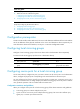
Configuring source CPUs for the local mirroring group
A mirroring group can contain multiple source CPUs.
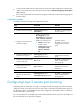
To configure source CPUs for a local mirroring group:
Ste
p
Command
Remarks
1. Enter system view.
system-view N/A