
R211x-HP Flexfabric 11900 Network Management and Monitoring Configuration Guide

157
HP recommends that you configure the destination device first, then the intermediate devices, and then
the source device.
Layer 2 remote port mirroring configuration task list
Tasks at a
g
lance
(Required.) Configuring a remote destination group on the destination device:
1. Creating a remote destination group
2. Configuring the monitor port for a remote destination group
3. Configuring the remote probe VLAN for a remote destination group
4. Assigning the monitor port to the remote probe VLAN
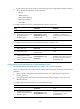
(Required.) Configuring a remote source group on the source device:
1. Creating a remote source group
2. P
erform at least one of the following tasks:
{ Configuring source ports for a remote source group
{ Configuring source CPUs for a remote source group
3. Configuring the egress port for a remote source group
4. Configuring the remote probe VLAN for a remote source group
Configuring a remote destination group on the destination
device
To configure a remote destination group, make the following configurations on the destination device.
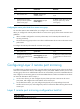
Creating a remote destination group
Ste
p
Command
Remarks
1. Enter system view.
system-view N/A
2. Create a remote destination
group.
mirroring-group group-id
remote-destination
By default, no remote destination
group exists on a device.
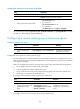
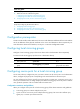
Configuring the monitor port for a remote destination group
You can configure the monitor port for a mirroring group in system view, or assign a port to a mirroring
group as the monitor port in interface view. The two modes have the same results.
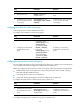
When you configure the monitor port for a remote destination group, follow these restrictions and
guidelines:
• Do not enable the spanning tree feature on the monitor port.
• When a Layer 2 aggregate interface is configured as the monitor port, do not configure its member
ports as source ports.
• Use a monitor port only for port mirroring to make sure the data monitoring device receives and
analyzes only the mirrored traffic rather than a mix of mirrored traffic and correctly forwarded
traffic.
• A mirroring group must contain only one monitor port.