
R211x-HP Flexfabric 11900 Network Management and Monitoring Configuration Guide

158
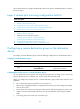
• Directly connect the monitor port for local port mirroring in source CPU mode to the data monitoring
device. Disable these functions on the monitor port:
{ 802.1X.
{ IGMP snooping.
{ MAC address learning.
{ Spanning tree feature.
{ Static ARP.
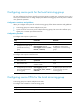
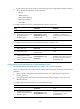
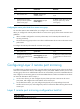
To configure the monitor port for a remote destination group in system view:
Ste
p
Command
Remarks
1. Enter system view.
system-view N/A
2. Configure the monitor port for
the specified remote
destination group.
mirroring-group group-id
monitor-port interface-type
interface-number
By default, no monitor port is
configured for a remote destination
group.
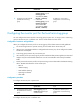
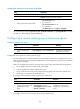
To configure the monitor port for a remote destination group in interface view:
Ste
p
Command
Remarks
1. Enter system view.
system-view N/A
2. Enter interface view.
interface interface-type
interface-number
N/A
3. Configure the port as the
monitor port for the specified
remote destination group.
mirroring-group group-id
monitor-port
By default, a port does not serve as
the monitor port for any remote
destination group.
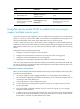
Configuring the remote probe VLAN for a remote destination group
You must first create a static VLAN before you configure it as a remote probe VLAN.
When you configure the remote probe VLAN for a remote destination group, follow these restrictions and
guidelines:
• When a VLAN is configured as a remote probe VLAN, use the remote probe VLAN for port
mirroring exclusively.
• Configure the same remote probe VLAN for the remote destination groups on the source and
destination devices.
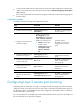
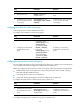
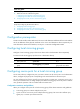
To configure the remote probe VLAN for a remote destination group:
Ste
p
Command
Remarks
1. Enter system view.
system-view N/A
2. Configure the remote probe
VLAN for the specified remote
destination group.
mirroring-group group-id
remote-probe vlan vlan-id
By default, no remote probe VLAN
is configured for a remote
destination group.