
R211x-HP Flexfabric 11900 Network Management and Monitoring Configuration Guide

165
Port mirroring configuration examples
Local port mirroring configuration example (in source port
mode)
Network requirements
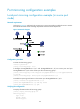
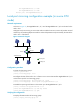
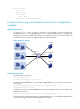
As shown in Figure 56, configure local port mirroring in source port mode to enable the server to monitor
the bidirectional traffic of the marketing department and the technical department.
Figure 56 Network diagram
Configuration procedure
# Create local mirroring group 1.
<Device> system-view
[Device] mirroring-group 1 local
# Configure Ten-GigabitEthernet 1/0/1 and Ten-GigabitEthernet 1/0/2 as source ports and port
Ten-GigabitEthernet 1/0/3 as the monitor port for local mirroring group 1.
[Device] mirroring-group 1 mirroring-port ten-gigabitethernet 1/0/1 ten-gigabitethernet
1/0/2 both
[Device] mirroring-group 1 monitor-port ten-gigabitethernet 1/0/3
# Disable the spanning tree feature on the monitor port Ten-GigabitEthernet 1/0/3.
[Device] interface ten-gigabitethernet 1/0/3
[Device-Ten-GigabitEthernet1/0/3] undo stp enable
[Device-Ten-GigabitEthernet1/0/3] quit
Verifying the configuration
# Display information about all mirroring groups.
[Device] display mirroring-group all
Mirroring group 1:
Type: Local
Status: Active
Mirroring port: