
R211x-HP Flexfabric 11900 Network Management and Monitoring Configuration Guide

170
Verifying the configuration
# Display information about all mirroring groups on Device C.
[DeviceC] display mirroring-group all
Mirroring group 2:
Type: Remote destination
Status: Active
Monitor port: Ten-GigabitEthernet1/0/2
Remote probe VLAN: 2
# Display information about all mirroring groups on Device A.
[DeviceA] display mirroring-group all
Mirroring group 1:
Type: Remote source
Status: Active
Mirroring port:
Ten-GigabitEthernet1/0/1 Both
Remote probe VLAN: 2
Layer 3 remote port mirroring configuration example
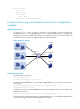
Network requirements
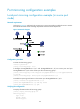
On a Layer 3 network shown in Figure 60, configure Layer 3 remote port mirroring and create a GRE
tunnel to enable the server to monitor the bidirectional traffic of the marketing department through a GRE
tunnel.
Figure 60 Network diagram
Configuration procedure
1. Configure IP addresses for the tunnel interfaces and related ports on the devices. (Details not
shown.)
2. Configure Device A (the source device):
# Create service loopback group 1, and specify the tunnel service for the group.
<DeviceA> system-view
[DeviceA] service-loopback group 1 type tunnel
XGE1/0/2
40.1.1.1/24
Source device
Device A
XGE1/0/1
10.1.1.1/24
Server
Marketing Dept.
Destination device
Device C
Tunnel0
50.1.1.1/24
Tunnel0
50.1.1.2/24
XGE1/0/2
20.1.1.1/24
XGE1/0/2
30.1.1.1/24
XGE1/0/1
20.1.1.2/24
XGE1/0/1
30.1.1.2/24
GRE tunnel
Intermediate device
Device B
Source port Destination port
Common port
XGE1/0/3
XGE1/0/3
Service loopback interface