
R211x-HP Flexfabric 11900 Network Management and Monitoring Configuration Guide

174
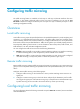
Local traffic mirroring configuration task list
Tasks at a
g
lance
(Required.) Configuring match criteria
(Required.) Configuring a traffic behavior
(Required.) Configuring a QoS policy
(Required.) Applying a QoS policy:
• Applying a QoS policy to an interface
• Applying a QoS policy to a VLAN
• Applying a QoS policy globally
• Applying a QoS policy to the control plane
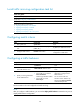
Configuring match criteria
Ste
p
Command
Remarks
1. Enter system view.
system-view N/A
2. Create a class and enter class
view.
traffic classifier tcl-name [ operator
{ and | or } ]
By default, no traffic class exists.
3. Configure match criteria.
if-match match-criteria
By default, no match criterion is
configured in a traffic class.
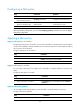
Configuring a traffic behavior
Ste
p
Command
Remarks
1. Enter system view.
system-view N/A
2. Create a traffic behavior and
enter traffic behavior view.
traffic behavior behavior-name
By default, no traffic behavior
exists.
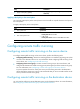
3. Specify a mirroring destination
for the traffic behavior.
• Mirror traffic to an interface:
mirror-to interface
interface-type interface-number
• Mirror traffic to a CPU:
mirror-to cpu
By default, no mirroring
destination is configured for a
traffic behavior.
You can mirror traffic to a
maximum of four interfaces by
executing the mirror-to interface
command multiple times.
The CPU resides in the card configured with traffic mirroring.
NOTE:
A
fter you configure a traffic behavior, you can use the display traffic behavior command in any view to
display traffic behavior configuration.