
R211x-HP Flexfabric 11900 Network Management and Monitoring Configuration Guide

177
Traffic mirroring configuration example
Local traffic mirroring configuration example
Network requirements
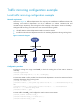
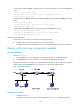
As shown in Figure 61, different departments of a company use IP addresses on different subnets. The
marketing and technical departments use the IP addresses on subnets 192.168.1.0/24 and
192.168.2.0/24, respectively. The working hour of the company is from 8:00 to 18:00 on weekdays.
Configure traffic mirroring so that the server can monitor the following traffic:
• All traffic that the technical department sends to access the Internet
• IP traffic that the technical department sends to the marketing department during working hours.
Figure 61 Network diagram
Configuration procedure
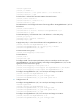
# Create a working hour range named work, in which the working hour is from 8:00 to 18:00 on
weekdays.
<DeviceA> system-view
[DeviceA] time-range work 8:00 to 18:00 working-day
# Create ACL 3000 to allow packets from the technical department to access the Internet and to the
marketing department during working hours.
[DeviceA] acl number 3000
[DeviceA-acl-adv-3000] rule permit tcp source 192.168.2.0 0.0.0.255 destination-port eq
www
[DeviceA-acl-adv-3000] rule permit ip source 192.168.2.0 0.0.0.255 destination
192.168.1.0 0.0.0.255 time-range work
[DeviceA-acl-adv-3000] quit
# Create traffic class tech_c, and configure the match criterion as ACL 3000.
[DeviceA] traffic classifier tech_c
[DeviceA-classifier-tech_c] if-match acl 3000
[DeviceA-classifier-tech_c] quit