
R211x-HP Flexfabric 11900 Network Management and Monitoring Configuration Guide

178
# Create traffic behavior tech_b, configure the action of mirroring traffic to port Ten-GigabitEthernet
1/0/3.
[DeviceA] traffic behavior tech_b
[DeviceA-behavior-tech_b] mirror-to interface ten-gigabitethernet 1/0/3
[DeviceA-behavior-tech_b] quit
# Create QoS policy tech_p, and associate traffic class tech_c with traffic behavior tech_b in the QoS
policy.
[DeviceA] qos policy tech_p
[DeviceA-qospolicy-tech_p] classifier tech_c behavior tech_b
[DeviceA-qospolicy-tech_p] quit
# Apply QoS policy tech_p to the incoming packets of Ten-GigabitEthernet 1/0/4.
[DeviceA] interface ten-gigabitethernet 1/0/4
[DeviceA-Ten-GigabitEthernet1/0/4] qos apply policy tech_p inbound
[DeviceA-Ten-GigabitEthernet1/0/4] quit
Verifying the configuration
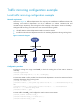
# Verify that you can monitor the following traffic through the server:
• All traffic sent by the technical department to access the Internet
• IP traffic that the technical department sends to the marketing department during working hours
Remote traffic mirroring configuration example
Network requirements
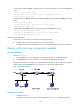
As shown in Figure 62:
• Ten-GigabitEthernet 1/0/2 of Device A is connected to the 10.1.1.1/24 network segment.
• Ten-GigabitEthernet 1/0/2 of Device C is connected to the data monitoring device.
Configure remote traffic mirroring to mirror the packets that are from the 10.1.1.1/24 network segment
and received on Ten-GigabitEthernet 1/0/2 of Device A to the data monitoring device.
Figure 62 Network diagram
Configuration procedure
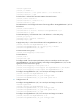
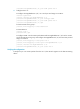
1. Configure Device A:
# Configure basic IPv4 ACL 2000 to match packets from the 10.1.1.1/24 network segment.