
R211x-HP Flexfabric 11900 Network Management and Monitoring Configuration Guide


186
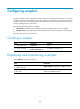
Configuring samplers
A sampler samples packets. The sampler selects a packet from among sequential packets, and it sends
the packet to other service modules for processing. Sampling is useful when you want to limit the volume
of traffic to be analyzed. The sampled data is statistically accurate and sampling decreases the impact
on the forwarding capacity of the device.
The following sampling modes are available:
• Fixed mode—The first packet is selected from among sequential packets in each sampling.
• Random mode—Any packet might be selected from among sequential packets in each sampling.
The switch supports only the fixed mode.
Creating a sampler
Ste
p
Command
Remarks
1. Enter system view.
system-view N/A
2. Create a sampler.
sampler sampler-name mode
fixed packet-interval rate
By default, no sampler exists.
Displaying and maintaining a sampler
Execute display commands in any view.
Task Command
Display configuration information about the sampler
(in standalone mode).
display sampler [ sampler-name ] [ slot slot-number ]
Display configuration information about the sampler
(in IRF mode).
display sampler [ sampler-name ] [ chassis
chassis-number slot slot-number ]