
R211x-HP Flexfabric 11900 Network Management and Monitoring Configuration Guide

193
Configuring GOLD
Generic Online Diagnostics (GOLD) runs diagnostic tests on a device to inspect device ports, RAM, chip,
connectivity, forwarding paths, and control paths for hardware faults, and reports the problems to the
system.
GOLD monitoring diagnostics run diagnostic tests periodically when the system is in operation and
record test results. Monitoring diagnostics only execute non-disruptive tests.
The parameters of a diagnostic test include test name, type, description, attribute (disruptive or
non-disruptive), default status, and execution interval. You can modify part of the parameters by using
the commands provided by this document.
The diagnostic tests are released with the system software image of the device. All enabled diagnostic
tests run in the background. You can use the display commands to view test results and logs to verify
hardware faults.
Only switching fabric modules support GOLD.
Configuring monitoring diagnostics
The system automatically executes enabled monitoring diagnostic tests after the device starts. Use the
diagnostic monitor enable command to enable monitoring diagnostic tests that are disabled by default.
Use the diagnostic monitor interval command to configure an execution interval for each test. The
interval you set must be no smaller than the minimum interval for each test. You can view the minimum
interval for a test by using the display diagnostic content command.
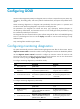
To configure monitoring diagnostics (in standalone mode):
Ste
p
Command
Remarks
1. Enter system view.
system-view N/A
2. Enable monitoring
diagnostics.
diagnostic monitor enable slot
slot-number-list [ test test-name ]
By default, all monitoring
diagnostic tests are disabled.
3. Set the execution interval.
diagnostic monitor interval slot
slot-number-list [ test test-name ] time
time
By default, the execution interval
for monitoring diagnostic tests is
10 seconds.
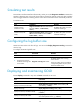
To configure monitoring diagnostics (in IRF mode):
Ste
p
Command
Remarks
1. Enter system view.
system-view N/A
2. Enable monitoring
diagnostics.
diagnostic monitor enable chassis
chassis-number slot slot-number-list
[ test test-name ]
By default, all monitoring
diagnostic tests are disabled.
3. Set the execution interval.
diagnostic monitor interval chassis
chassis-number slot slot-number-list
[ test test-name ] time time
By default, the execution interval
for monitoring diagnostic tests is
10 seconds.