
R211x-HP Flexfabric 11900 Network Management and Monitoring Configuration Guide

195
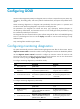
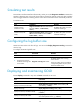
Task Command
Display configurations for simulated tests (in
standalone mode).
display diagnostic simulation [ slot slot-number ]
Display configurations for simulated tests (in
IRF mode).
display diagnostic simulation [ chassis chassis-number [ slot
slot-number ] ]
Clear GOLD logs. reset diagnostic event-log
Clear test results (in standalone mode). reset diagnostic result [ slot slot-number [ test test-name ] ]
Clear test results (in IRF mode).
reset diagnostic result [ chassis chassis-number [ slot
slot-number [ test test-name ] ] ]
GOLD configuration example (in standalone mode)
Network requirements
Enable monitoring diagnostic test HGMonitor on card 10 and set its execution interval to 1 minute.
Configuration procedure
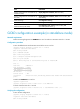
# View the default status and execution interval of the test on card 10.
<Sysname> display diagnostic content slot 10 verbose
Diagnostic test suite attributes:
#B/*: Bootup test/NA
#O/*: Ondemand test/NA
#M/*: Monitoring test/NA
#D/*: Disruptive test/Non-disruptive test
#P/*: Per port test/NA
#A/I/*: Monitoring test is active/Monitoring test is inactive/NA
Slot 10:
Test name : HGMonitor
Test attributes : **M*PI
Test interval : 00:00:10
Min interval : 00:00:10
Correct-action : -NA-
Description : A Real-time test, disabled by default that checks link status between
ports.
# Enable test HGMonitor on card 10.
<Sysname> system-view
[Sysname] diagnostic monitor enable slot 10 test HGMonitor
# Set the execution interval to 1 minute.
[Sysname] diagnostic monitor interval slot 10 test HGMonitor time 0:1:0
Verifying the configuration
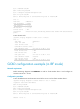
# View the test configuration.
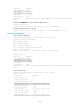
[Sysname] display diagnostic content slot 10 verbose
Diagnostic test suite attributes:
#B/*: Bootup test/NA