
R211x-HP Flexfabric 11900 Network Management and Monitoring Configuration Guide

196
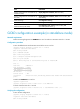
#O/*: Ondemand test/NA
#M/*: Monitoring test/NA
#D/*: Disruptive test/Non-disruptive test
#P/*: Per port test/NA
#A/I/*: Monitoring test is active/Monitoring test is inactive/NA
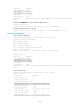
Slot 10:
Test name : HGMonitor
Test attributes : **M*PA
Test interval : 00:01:00
Min interval : 00:00:10
Correct-action : -NA-
Description : A Real-time test, disabled by default that checks link status between
ports.
# View the test result.
[Sysname] display diagnostic result slot 10 verbose
Slot 10:
Test name : HGMonitor
Total run count : 3
Total failure count : 0
Consecutive failure count: 0
Last execution time : Fri Jul 26 16:28:10 2013
First failure time : -NA-
Last failure time : -NA-
Last pass time : Fri Jul 26 16:28:10 2013
Last execution result : Success
Last failure reason : -NA-
Next execution time : Fri Jul 26 16:29:10 2013
GOLD configuration example (in IRF mode)
Network requirements
Enable monitoring diagnostic test HGMonitor on card 10 of IRF member device 1 and configure its
execution interval as 1 minute.
Configuration procedure
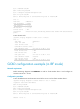
# View the default status and execution interval of the test on card 10 of IRF member device 1.
<Sysname> display diagnostic content chassis 1 slot 10 verbose
Diagnostic test suite attributes:
#B/*: Bootup test/NA
#O/*: Ondemand test/NA
#M/*: Monitoring test/NA
#D/*: Disruptive test/Non-disruptive test
#P/*: Per port test/NA
#A/I/*: Monitoring test is active/Monitoring test is inactive/NA
Chassis 1 Slot 10: