
R211x-HP Flexfabric 11900 Network Management and Monitoring Configuration Guide


24
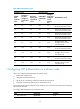
Table 4 NTP authentication results
Broadcast server
Broadcast client
Authentication result
Enable
NTP
authentic
ation
Configure a
key and
configure it
as a trusted
key
Associate
the key with
a broadcast
server
Enable NTP
authenticati
on
Configure
a key and
configure
it as a
trusted
ke
y
Yes Yes Yes Yes Yes
Succeeded. NTP messages can
be sent and received correctly.
Yes Yes Yes Yes No
Failed. NTP messages cannot
be sent and received correctly.
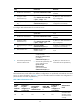
Yes Yes Yes No N/A
Failed. NTP messages cannot
be sent and received correctly.
Yes No Yes Yes N/A
Failed. NTP messages cannot
be sent and received correctly.
Yes No Yes No N/A
No authentication. NTP
messages can be sent and
received correctly.
Yes N/A No Yes N/A
Failed. NTP messages cannot
be sent and received correctly.
Yes N/A No No N/A
No authentication. NTP
messages can be sent and
received correctly.
No N/A N/A Yes N/A
Failed. NTP messages cannot
be sent and received correctly.
No N/A N/A No N/A
No authentication. NTP
messages can be sent and
received correctly.
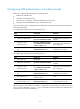
Configuring NTP authentication in multicast mode
When you configure NTP authentication in multicast mode:
• Enable NTP authentication.
• Configure an authentication key.
• Set the key as a trusted key on both the multicast client and server.
• Configure an NTP authentication key on the multicast server.
The key IDs and key values configured on the multicast server and client must be the same. Otherwise,
NTP authentication fails.
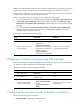
To configure NTP authentication for a multicast client:
Ste
p
Command
Remarks
1. Enter system view.
system-view N/A