
R211x-HP Flexfabric 11900 Network Management and Monitoring Configuration Guide


26
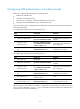
Multicast server Multicast client
Authentication
result
Enable
NTP
authentic
ation
Configure a
key and
configure it as
a trusted ke
y
Associate the
key with a
multicast server
Enable NTP
authenticatio
n
Configure a
key and
configure it as
a trusted ke
y
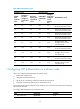
Yes Yes Yes Yes No
Failed. NTP
messages cannot
be sent and
received correctly.
Yes Yes Yes No N/A
Failed. NTP
messages cannot
be sent and
received correctly.
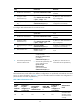
Yes No Yes Yes N/A
Failed. NTP
messages cannot
be sent and
received correctly.
Yes No Yes No N/A
No authentication.
NTP messages
can be sent and
received correctly.
Yes N/A No Yes N/A
Failed. NTP
messages cannot
be sent and
received correctly.
Yes N/A No No N/A
No authentication.
NTP messages
can be sent and
received correctly.
No N/A N/A Yes N/A
Failed. NTP
messages cannot
be sent and
received correctly.
No N/A N/A No N/A
No authentication.
NTP messages
can be sent and
received correctly.
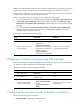
Configuring NTP optional parameters
The configuration tasks in this section are optional tasks. Configure them to improve NTP security,
performance, or reliability.
Specifying the source interface for NTP messages
To prevent interface status changes from causing NTP communication failures, configure the device to use
the IP address of an interface that is always up, for example, a loopback interface, as the source IP