
R211x-HP Flexfabric 11900 Network Management and Monitoring Configuration Guide

29
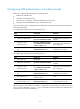
• Before you configure this feature, adjust the local system time to make sure it is accurate.
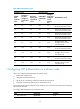
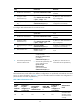
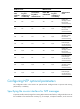
To configure the local clock as a reference source:
Ste
p
Command
Remarks
1. Enter system view.
system-view N/A
2. Configure the local clock as a
reference source.
ntp-service refclock-master
[ ip-address ] [ stratum ]
By default, the device does not use
the local clock as a reference
source.
Displaying and maintaining NTP
Execute display commands in any view.
Task Command
Display information about NTP service status. display ntp-service status
Display information about IPv4 NTP associations. display ntp-service sessions [ verbose ]
Display information about IPv6 NTP associations. display ntp-service ipv6 sessions [ verbose ]
Display brief information about the NTP servers from
the local device back to the primary reference source.
display ntp-service trace
NTP client/server mode configuration example
Network requirements
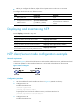
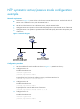
As shown in Figure 9, the local clock of Device A is to be used as a reference source, with the stratum level
2. Device B operates in client mode and Device A is to be used as the NTP server for Device B.
Figure 9 Network diagram
Configuration procedure
1. Set the IP address for each interface as shown in Figure 9. (Details not shown.)
2. Configure Device A:
# Enable the NTP service.
<DeviceA> system-view
[DeviceA] ntp-service enable
# Specify the local clock as the reference source, with the stratum level 2.
[DeviceA] ntp-service refclock-master 2
3. Configure Device B:
# Enable the NTP service.