
R211x-HP Flexfabric 11900 Network Management and Monitoring Configuration Guide

50
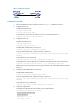
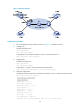
Figure 19 Network diagram
Configuration procedure
1. Set the IP address for each interface as shown in Figure 19. (Details not shown.)
2. Configure CE 1:
# Enable the NTP service.
<CE1> system-view
[CE1] ntp-service enable
# Specify the local clock as the reference source, with the stratum level 2.
[CE1] ntp-service refclock-master 2
3. Configure PE 1:
# Enable the NTP service.
<PE1> system-view
[PE1] ntp-service enable
# Specify CE 1 in VPN 1 as the symmetric-passive peer of PE 1.
[PE1] ntp-service unicast-peer 10.1.1.1 vpn-instance vpn1
4. Verify the configuration:
# Display the IPv4 NTP association information and status on PE 1 a certain period of time later.
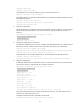
[PE1] display ntp-service status
Clock status: synchronized
Clock stratum: 3
System peer: 10.1.1.1
Local mode: sym_active
Reference clock ID: 10.1.1.1
Leap indicator: 00
Clock jitter: 0.005096 s
Stability: 0.000 pps
Clock precision: 2^-10
Root delay: 0.00655 ms
Root dispersion: 1.15869 ms
Reference time: d0c62687.ab1bba7d Wed, Dec 29 2010 21:28:39.668