
R211x-HP Flexfabric 11900 Network Management and Monitoring Configuration Guide


58
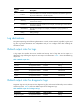
Default output rules for security logs
Security logs can only be output to the security log file, and cannot be filtered by source modules and
severity levels. Table 9 sh
ows the default output rule for security logs.
Table 9 Default output rule for security logs
Destination Lo
g
source modules
Out
p
ut switch
Severit
y
Security log file All supported modules Disabled Debug
Default output rules for hidden logs
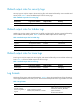
Hidden logs can be output to the log host, log buffer, and the log file, but they cannot be filtered by
source modules and severity levels. Table 10 sh
ows the default output rules for hidden logs.
Table 10 Default output rules for hidden logs
Destination Lo
g
source modules
Out
p
ut switch
Severit
y
Log host All supported modules Enabled Informational
Log buffer All supported modules Enabled Informational
Log file All supported modules Enabled Informational
Default output rules for trace logs
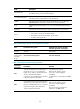
Trace logs can only be output to the trace log file, and cannot be filtered by source modules and severity
levels. Table 11 sh
ows the default output rules for trace logs.
Table 11 Default output rules for trace logs
Destination Lo
g
source modules
Out
p
ut switch
Severit
y
Trace log file All supported modules Enabled Debugging
Log formats
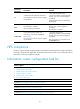
The format of logs varies with output destinations. Table 12 shows the original format of log information,
which might be different from what you see. The actual format depends on the log resolution tool used.
Table 12 Log formats
Output destination Format Example
Console, monitor
terminal, log buffer, or
log file
Prefix Timestamp Sysname
Module/Level/Mnemonic: Content
%Nov 24 14:21:43:502 2010 HP
SYSLOG/6/SYSLOG_RESTART:
System restarted –-
HP Comware Software.