
R211x-HP Flexfabric 11900 Network Management and Monitoring Configuration Guide

63
Ste
p
Command
Remarks
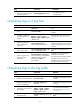
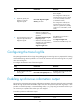
8. (Optional.) Set the lowest level
of logs that can be output to
the monitor terminal.
terminal logging level severity
The default setting is 6
(informational).
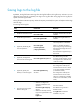
Outputting logs to a log host
Ste
p
Command
Remarks
1. Enter system view.
system-view N/A
2. Enable the information
center.
info-center enable
By default, the information center is
enabled.
3. Configure an output rule
for outputting logs to a
log host.
info-center source { module-name |
default } { console | monitor |
logbuffer | logfile | loghost } { deny
| level severity }
For information about default output
rules, see "Default output rules for
logs."
4. (Optional.) Specify the
source IP address for
output logs.
info-center loghost source
interface-type interface-number
By default, the source IP address of
output log information is the primary IP
address of the matching route's egress
interface.
5. (Optional.) Configure
the timestamp format.
info-center timestamp loghost { date
| iso | no-year-date | none }
By default, the timestamp format is
date.
6. Specify a log host and
configure related
parameters.
info-center loghost [ vpn-instance
vpn-instance-name ] { ipv4-address
| ipv6 ipv6-address } [ port
port-number ] [ facility
local-number ]
By default, no log host or related
parameters are specified.
The value of the port-number argument
must be the same as the value
configured on the log host. Otherwise,
the log host cannot receive logs.
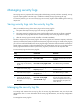
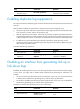
Outputting logs to the log buffer
Ste
p
Command
Remarks
1. Enter system view.
system-view N/A
2. Enable the information center.
info-center enable
By default, the information center is
enabled.
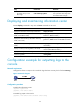
3. (Optional.) Set the maximum
number of logs that can be
stored in the log buffer.
info-center logbuffer size
buffersize
By default, the log buffer can store
512 logs.
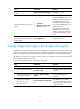
4. Configure an output rule for
the log buffer.
info-center source { module-name |
default } { console | monitor |
logbuffer | logfile | loghost }
{ deny | level severity }
For information about default
output rules, see "Default output
rules for logs."
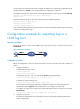
5. (Optional.) Configure the
timestamp format.
info-center timestamp { boot | date
| none }
By default, the timestamp format is
date.