
R211x-HP Flexfabric 11900 Network Management and Monitoring Configuration Guide

66
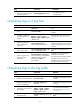
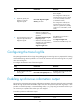
Task Command
Remarks
Display a summary of the security
log file.
display security-logfile summary
Available in user view.
Change the directory of the security
log file.
1. system-view
2. info-center security-logfile
directory dir-name
By default, the security log file is
saved in the seclog directory in the
root directory of the storage device.
The configuration made by this
command cannot survive a reboot
or an active/standby switchover. (In
standalone mode.)
The configuration made by this
command cannot survive an IRF
reboot or a global active/standby
switchover in an IRF fabric. (In IRF
mode.)
Manually save all the contents in
the security log file buffer into the
security log file.
security-logfile save Available in any view.
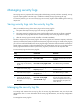
Saving diagnostic logs to the diagnostic log file
By default, the system saves diagnostic logs from the diagnostic log buffer to the diagnostic log file every
24 hours. You can adjust the saving interval or manually save diagnostic logs to the diagnostic log file.
After saving diagnostic logs into the diagnostic log file, the system clears the diagnostic log buffer.
The diagnostic log file has a maximum capacity. When the capacity is reached, the system replaces
earliest diagnostic logs with new logs.
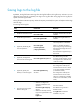
To enable saving diagnostic logs to the diagnostic log file:
Ste
p
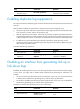
Command
Remarks
1. Enter system view.
system-view N/A
2. Enable the information center.
info-center enable
By default, the information center is
enabled.
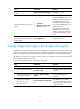
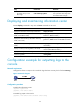
3. Enable saving diagnostic logs
to the diagnostic log file.
info-center diagnostic-logfile
enable
By default, saving diagnostic logs
to the diagnostic log file is
enabled.
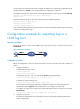
4. (Optional.) Configure the
maximum size of the
diagnostic log file.
info-center diagnostic-logfile quota
size
The default setting is 10 MB.
To ensure normal operation, set the
size argument to a value between
1 MB and 10 MB.