
R211x-HP Flexfabric 11900 Network Management and Monitoring Configuration Guide

67
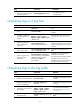
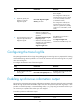
Ste
p
Command
Remarks
5. (Optional.) Specify the
directory to save the
diagnostic log file.
info-center diagnostic-logfile
directory dir-name
The default setting is
flash:/diagfile.
The configuration made by this
command cannot survive a reboot
or an active/standby switchover.
(In standalone mode.)
The configuration made by this
command cannot survive an IRF
reboot or a global active/standby
switchover in an IRF fabric. (In IRF
mode.)
6. Save the diagnostic logs in the
diagnostic log buffer to the
diagnostic log file.
• Method 1: Configure the
interval to perform the saving
operation:
info-center diagnostic-logfile
frequency freq-sec
• Method 2: Manually save the
diagnostic logs in the buffer to
a diagnostic log file:
diagnostic-logfile save
The default saving interval is
86400 seconds.
The diagnostic-logfile save
command is available in any view.
Configuring the trace log file
The system generates lots of trace logs during debugging. The trace logs are very important for locating
and troubleshooting network problems. You can set the maximum size of the trace log file to a proper
value to avoid log loss.
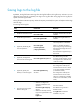
To configure the maximum size of the trace log file:
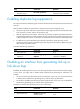
Ste
p
Command
Remarks
1. Enter system view.
system-view N/A
2. Set the maximum size of the
trace log file.
info-center trace-logfile quota size
By default, the maximum size of the
trace log file is 1 MB.
Enabling synchronous information output
The system log output interrupts ongoing configuration operations, obscuring previously input commands
before the logs. Synchronous information output can show the previous input after log output. It also
provides a command prompt in command editing mode, or a [Y/N] string in interaction mode so you
can continue your operation from where you were stopped.
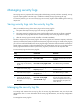
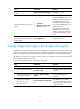
To enable synchronous information output:
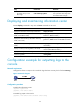
Ste
p
Command
Remarks
1. Enter system view.
system-view N/A