
R211x-HP Flexfabric 11900 Network Management and Monitoring Configuration Guide

77
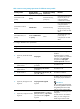
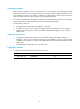
Table 16 Basic security setting requirements for different security models
Security model
Security model
ke
y
word for the
g
rou
p
Security key settings
for the user
Remarks
Authentication with
privacy
privacy
Authentication key,
privacy key
If the authentication key or
the privacy key is not
configured, SNMP
communication will fail.
Authentication without
privacy
authentication Authentication key
If no authentication key is
configured, SNMP
communication will fail.
The privacy key (if any)
for the user does not take
effect.
No authentication, no
privacy
Neither authentication
nor privacy
None
The authentication and
privacy keys, if
configured, do not take
effect.
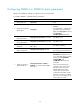
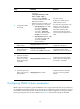
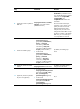
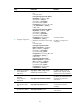
To configure SNMPv3 basic parameters:
Ste
p
Command
Remarks
1. Enter system view.
system-view N/A
2. (Optional.) Enable the SNMP
agent.
snmp-agent
By default, the SNMP agent is
disabled.
The SNMP agent is enabled
when you perform any command
that begins with snmp-agent
except for the snmp-agent
calculate-password command.
3. (Optional.) Configure the
system contact.
snmp-agent sys-info contact
sys-contact
The default is null.
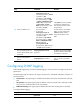
4. (Optional.) Configure the
system location.
snmp-agent sys-info location
sys-location
The default is null.
5. Enable SNMPv3.
snmp-agent sys-info version { all |
{ v1 | v2c | v3 }* }
The default is SNMPv3.
6. (Optional.) Change the local
engine ID.
snmp-agent local-engineid
engineid
By default, the local engine ID is
the company ID plus the device
ID.
IMPORTANT:
After you change the local engine
ID, the existing SNMPv3 users and
encrypted keys become invalid,
and you must re-configure them.
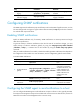
7. (Optional.) Configure a remote
engine ID.
snmp-agent remote { ip-address |
ipv6 ipv6-address } [ vpn-instance
vpn-instance-name ] engineid
engineid
By default, no remote engine ID is
configured.
To send informs to an SNMPv3
NMS, you must configure the
SNMP engine ID of the NMS.