
R211x-HP Flexfabric 11900 Network Management and Monitoring Configuration Guide

79
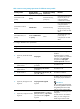
Ste
p
Command
Remarks
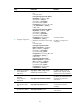
12. Create an SNMPv3 user.
• In non-FIPS mode:
snmp-agent usm-user v3
user-name group-name [ remote
{ ip-address | ipv6
ipv6-address } [ vpn-instance
vpn-instance-name ] ] [ { cipher
| simple } authentication-mode
{ md5 | sha } auth-password
[ privacy-mode { aes128 |
des56 } priv-password ] ] [ acl
acl-number | acl ipv6
ipv6-acl-number ] *
• In FIPS mode:
snmp-agent usm-user v3
user-name group-name [ remote
{ ip-address | ipv6
ipv6-address } [ vpn-instance
vpn-instance-name ] ] { cipher |
simple } authentication-mode
sha auth-password
[ privacy-mode aes128
priv-password ] [ acl acl-number
| acl ipv6 ipv6-acl-number ] *
If the cipher keyword is specified,
the arguments auth-password
and priv-password are used as
encrypted keys.
To send informs to an SNMPv3
NMS, you must configure the
remote ip-address option to
specify the IP address of the
NMS.
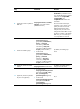
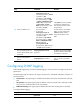
13. (Optional.) Configure the
maximum SNMP packet size
(in bytes) that the SNMP agent
can handle.
snmp-agent packet max-size
byte-count
By default, the maximum SNMP
packet size that the SNMP agent
can handle is 1500 bytes.
14. (Optional.) Specify the UDP
port for receiving SNMP
packets.
snmp-agent port port-number
By default, the device uses UDP
port 161 for receiving SNMP
packets.
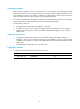
Configuring SNMP logging
Enable SNMP logging only if necessary. SNMP logging is memory-intensive and might impact device
performance.
The SNMP agent logs Get requests, Set requests, Set responses, and SNMP notifications, but does not
log Get responses.
• Get operation—The agent logs the IP address of the NMS, name of the accessed node, and node
OID.
• Set operation—The agent logs the NMS' IP address, name of accessed node, node OID, variable
value, and error code and index for the Set operation.
• Notification tracking—The agent logs the SNMP notifications after sending them to the NMS.
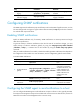
To configure SNMP logging:
Ste
p
Command
Remarks
1. Enter system view.
system-view N/A