
R211x-HP Flexfabric 11900 Network Management and Monitoring Configuration Guide

83
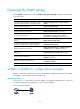
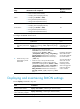
Displaying the SNMP settings
Execute display commands in any view. The display snmp-agent community command is supported only
in non-FIPS mode.
Task
Command
Display SNMP agent system information, including
the contact, physical location, and SNMP version.
display snmp-agent sys-info [ contact | location |
version ]
Display SNMP agent statistics. display snmp-agent statistics
Display the local engine ID. display snmp-agent local-engineid
Display SNMP group information. display snmp-agent group [ group-name ]
Display remote engine IDs.
display snmp-agent remote [ ip-address
[ vpn-instance vpn-instance-name ] | ipv6
ipv6-address [ vpn-instance vpn-instance-name ] ]
Display basic information about the notification
queue.
display snmp-agent trap queue
Display the modules that can generate notifications
and their notification status (enable or disable).
display snmp-agent trap-list
Display SNMPv3 user information.
display snmp-agent usm-user [ engineid engineid |
username user-name | group group-name ] *
Display SNMPv1 or SNMPv2c community
information.
display snmp-agent community [ read | write ]
Display MIB view information.
display snmp-agent mib-view [ exclude | include |
viewname view-name ]
Display SNMP MIB node information.
display snmp-agent mib-node [ details | index-node
| trap-node | verbose ]
Display an SNMP context. display snmp-agent context [ context-name ]
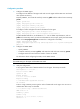
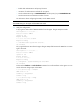
SNMPv1/SNMPv2c configuration example
SNMPv1 configuration procedure is the same as the SNMPv2c configuration procedure. This example
uses SNMPv1, and is available only for non-FIPS mode.
Network requirements
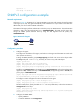
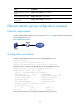
As shown in Figure 27, t h e N M S (1.1.1. 2 / 2 4 ) u s e s S N M P v 1 t o m a n a g e t h e S N M P a g e n t (1.1.1.1 / 24 ) , a n d
the agent automatically sends notifications to report events to the NMS.
Figure 27 Network diagram