
R211x-HP Flexfabric 11900 Security Configuration Guide

92
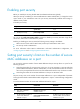
Enabling port security
Before you enable port security, disable 802.1X and MAC authentication globally.
When port security is enabled, you cannot enable 802.1X or MAC authentication, or change the access
control mode or port authorization state. The port security automatically modifies these settings in
different security modes.
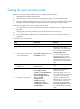
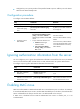
To enable port security:
Ste
p
Command
Remarks
1. Enter system view.
system-view N/A
2. Enable port security.
port-security enable
By default, port security is
disabled.
You can use the undo port-security enable command to disable port security. Because it logs off the
online users, make sure no online users are present.
Enabling or disabling port security resets the following security settings to the default:
• 802.1X access control mode is MAC based, and the port authorization state is auto.
• Port security mode is noRestrictions.
For more information about 802.1X authentication and MAC authentication configuration, see
"Configuring 802.1X" and "Configuring MAC authentication."
Setting port security's limit on the number of secure
MAC addresses on a port
You can set the maximum number of secure MAC addresses that port security allows on a port for the
following purposes:
• Controlling the number of concurrent users on the port. For a port operating in a security mode that
performs MAC authentication, 802.1X authentication, or both, the maximum number of concurrent
users on the port equals this limit or the limit of the authentication mode in use, whichever is smaller.
• Controlling the number of secure MAC addresses on the port in autoLearn mode.
The port security's limit on the number of secure MAC addresses on a port is independent of the MAC
learning limit described in MAC address table configuration in Layer 2—LAN Switching Configuration
Guide.
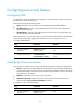
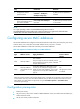
To set the maximum number of secure MAC addresses allowed on a port:
Ste
p
Command
Remarks
1. Enter system view.
system-view N/A
2. Enter Layer 2 Ethernet
interface view.
interface interface-type
interface-number
N/A
3. Set the maximum number of
secure MAC addresses
allowed on a port.
port-security max-mac-count
count-value
By default, port security does not
limit the number of secure MAC
addresses on a port.