
R211x-HP Flexfabric 11900 Security Configuration Guide

94
Configuring port security features
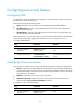
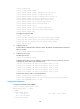
Configuring NTK
The NTK feature checks the destination MAC addresses in outbound frames to make sure frames are
forwarded only to authenticated devices.
The NTK feature supports the following modes:
• ntkonly—Forwards only unicast frames with authenticated destination MAC addresses.
• ntk-withbroadcasts—Forwards only broadcast frames and unicast frames with authenticated
destination MAC addresses.
• ntk-withmulticasts—Forwards only broadcast frames, multicast frames, and unicast frames with
authenticated destination MAC addresses.
With the NTK feature, any unicast frame with an unknown destination MAC address is discarded. Not
all port security modes support triggering the NTK feature. For more information, see Table 5.
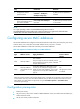
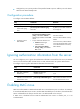
T
o configure the NTK feature:
Ste
p
Command
Remarks
1. Enter system view.
system-view N/A
2. Enter Layer 2 Ethernet
interface view.
interface interface-type
interface-number
N/A
3. Configure the NTK feature.
port-security ntk-mode
{ ntk-withbroadcasts |
ntk-withmulticasts | ntkonly }
By default, NTK is disabled on a
port and all frames are allowed to
be sent.
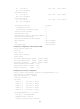
Configuring intrusion protection
Intrusion protection enables a device to take one of the following actions in response to illegal frames:
• blockmac—Adds the source MAC addresses of illegal frames to the blocked MAC addresses list
and discards the frames. All subsequent frames sourced from a blocked MAC address are dropped.
A blocked MAC address is restored to normal state after being blocked for 3 minutes. The interval
is fixed and cannot be changed.
• disableport—Disables the port until you bring it up manually.
• disableport-temporarily—Disables the port for a specific period of time. The period can be
configured with the port-security timer disableport command.
To configure the intrusion protection feature:
Ste
p
Command
Remarks
1. Enter system view.
system-view N/A
2. Enter Layer 2 Ethernet
interface view.
interface interface-type
interface-number
N/A