
R211x-HP Flexfabric 11900 Security Configuration Guide

97
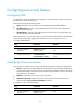
HP recommends you enable MAC move for wireless users that roam between ports to access the
network.
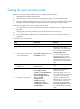
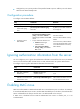
To enable MAC move:
Ste
p
Command
Remarks
1. Enter system view.
system-view N/A
2. Enable MAC move.
port-security mac-move permit By default, MAC move is disabled.
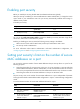
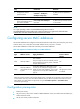
Displaying and maintaining port security
Execute display commands in any view.
Task Command
Display the port security configuration,
operation information, and statistics.
display port-security [ interface interface-type interface-number ]
Display information about secure MAC
addresses.
display port-security mac-address security [ interface
interface-type interface-number ] [ vlan vlan-id ] [ count ]
Display information about blocked MAC
addresses.
display port-security mac-address block [ interface interface-type
interface-number ] [ vlan vlan-id ] [ count ]
Port security configuration examples
autoLearn configuration example
Network requirements
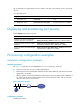
See Figure 34. Configure port Ten-GigabitEthernet 1/0/1 on the device, as follows:
• Accept up to 64 users on the port without authentication.
• Permit the port to learn and add MAC addresses as sticky MAC addresses, and set the secure MAC
aging timer to 30 minutes.
• After the number of secure MAC addresses reaches 64, the port stops learning MAC addresses. If
any frame with an unknown MAC address arrives, intrusion protection starts, and the port shuts
down and stays silent for 30 seconds.
Figure 34 Network diagram
Configuration procedure
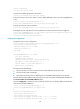
# Enable port security.
Internet
Device
XGE1/0/1
Host