
R211x-HP Flexfabric 11900 Security Configuration Guide

99
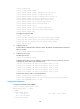
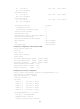
port-security mac-address security sticky 0002-0000-0013 vlan 1
port-security mac-address security sticky 0002-0000-0012 vlan 1
port-security mac-address security sticky 0002-0000-0011 vlan 1
#
# Execute the display port-security interface command after the number of MAC addresses learned by
the port reaches 64. The port security mode is changed to secure. When a frame with an unknown MAC
address arrives, intrusion protection is triggered. The port will be disabled for 30 seconds. (Details not
shown.)
# After the port is re-enabled, Use the undo port-security mac-address security command to delete
several secure MAC addresses. The port security mode of the port changes to autoLearn, and the port
can learn MAC addresses again. (Details not shown.)
userLoginWithOUI configuration example
Network requirements
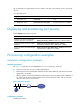
As shown in Figure 35, a client is connected to the device through port Ten-GigabitEthernet 1/0/1. The
device authenticates the client with a RADIUS server. If the authentication succeeds, the client is
authorized to access the Internet.
• The RADIUS server at 192.168.1.2 functions as the primary authentication server and the secondary
accounting server, and the RADIUS server at 192.168.1.3 functions as the secondary authentication
server and the primary accounting server. The shared key for authentication is name, and that for
accounting is money.
• All users use the authentication, authorization, and accounting methods of ISP domain sun.
• The RADIUS server response timeout time is 5 seconds and the maximum number of RADIUS packet
retransmission attempts is 5. The Device sends real-time accounting packets to the RADIUS server at
15-minute intervals, and sends usernames without domain names to the RADIUS server.
Configure port Ten-GigabitEthernet 1/0/1 of the device to allow only one 802.1X user and a user that
uses one of the specified OUI values to be authenticated.
Figure 35 Network diagram
Configuration procedure
The following configuration steps cover some AAA/RADIUS configuration commands. For more
information about the commands, see Security Command Reference.
Make sure the host and the RADIUS server can reach each other.
1. Configure AAA:
# Configure a RADIUS scheme named radsun.