
R211x-HP Flexfabric 11900 Security Configuration Guide

122
Ste
p
Command
Remarks
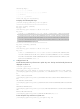
3. Type or copy the key.
N/A
You can use spaces and carriage returns,
but the system does not save them.
4. Return to system view.
peer-public-key end
When you exit public key view, the
system automatically saves the public
key.
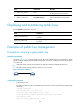
Displaying and maintaining public keys
Execute display commands in any view.
Task Command
Display local public keys.
display public-key local { dsa | ecdsa | rsa } public [ name
key-name ]
Display peer public keys.
display public-key peer [ brief | name publickey-name ] [ name
key-name ]
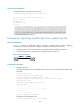
Examples of public key management
Example for entering a peer public key
Network requirements
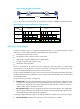
As shown in Figure 38, to prevent illegal access, Device B authenticates Device A through a digital
signature. Before configuring authentication parameters on Device B, configure the public key of Device
A on Device B.
• Configure Device B to use the asymmetric key algorithm of RSA to authenticate Device A.
• Manually specify the host public key of Device A on Device B.
Figure 38 Network diagram
Configuration procedure
1. Configure Device A:
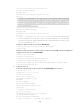
# Create local RSA key pairs with default names on Device A, and use the default modulus length
1024 bits.
<DeviceA> system-view
[DeviceA] public-key local create rsa
The range of public key modulus is (512 ~ 2048).
If the key modulus is greater than 512, it will take a few minutes.
Press CTRL+C to abort.
Input the modulus length [default = 1024]:
Device A Device B