
R211x-HP Flexfabric 11900 Security Configuration Guide

143
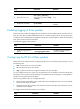
Ste
p
Command
Remarks
2. Enter interface view.
interface interface-type
interface-number
N/A
3. Configure the DF bit of
IPsec packets on the
interface.
ipsec df-bit { clear | copy | set }
By default, the interface uses the
global DF bit setting.
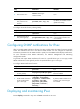
To configure the DF bit of IPsec packets globally:
Ste
p
Command
Remarks
1. Enter system view.
system-view N/A
2. Configure the DF bit of
IPsec packets globally.
ipsec global-df-bit { clear | copy | set }
By default, IPsec copies the DF bit
in the original IP header to the
new IP header.
Configuring SNMP notifications for IPsec
After you enable SNMP notifications for IPsec, the IPsec module notifies the NMS of important module
events. The notifications are sent to the device's SNMP module. You can configure the notification
transmission parameters for the SNMP module to specify how the SNMP module displays notifications.
For more information about SNMP notifications, see Network Management and Monitoring
Configuration Guide.
To generate and output SNMP notifications for IPsec for a specific failure type or event type, enable
SNMP notifications for IPsec globally and for the specified failure type or event type.
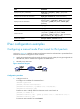
To configure SNMP notifications for IPsec:
Ste
p
Command
Remarks
1. Enter system view
system-view N/A
2. Enable SNMP notifications
for IPsec globally.
snmp-agent trap enable ipsec global
By default, SNMP notifications for
IPsec are enabled.
3. Enable SNMP notifications
for the specified failure
type or event type.
snmp-agent trap enable ipsec
[ auth-failure | decrypt-failure |
encrypt-failure | invalid-sa-failure |
no-sa-failure | policy-add |
policy-attach | policy-delete |
policy-detach | tunnel-start |
tunnel-stop ] *
By default, SNMP notifications for
all failure types and event types
are enabled.
Displaying and maintaining IPsec
Execute display commands in any view and reset commands in user view.